Australia Student & Expat Resource Hub | NammAustralia Australia Student & Expat Resource Hub | NammAustralia

Latest post

Partner Visa and NOICC: Can You Still Apply Onshore?

Partner Visa and NOICC: Can You Still Apply Onshore?

  • Maithili
  • May 27, 2026
Work Experience vs. Vocational Placement: 2026 Legal Differences

Work Experience vs. Vocational Placement: 2026 Legal Differences

  • Aarav
  • May 27, 2026
How to Protect Your PR Pathway After a NOICC

How to Protect Your PR Pathway After a NOICC

  • Sara
  • May 27, 2026

Popular Posts

Top 10 High-Interest Savings Accounts Australia: A Student Guide

Top 10 High-Interest Savings Accounts Australia: A Student Guide (414)

  • Aarav
  • March 6, 2026
Australia Student Visa Refund Policy: Rejection Guide

Australia Student Visa Refund Policy: Rejection Guide (340)

  • Sara
  • March 9, 2026
Regional Australia Postcode List 2026: The “Extra 5 Points” Guide

Regional Australia Postcode List 2026: The “Extra 5 Points” Guide (330)

  • Maithili
  • March 17, 2026
Felix Mobile Review 2026: Is the $20 Unlimited Data Plan Worth It?

Felix Mobile Review 2026: Is the $20 Unlimited Data Plan Worth It? (325)

  • Aarav
  • March 25, 2026
Telstra vs Optus vs Vodafone 2026: Australia’s Best Network Comparison

Telstra vs Optus vs Vodafone 2026: Australia’s Best Network Comparison (315)

  • Maithili
  • March 16, 2026

Stay Connected


Professionally fabricate client-centered content for superior expertise. Objectively leverage others covalent imperatives vis-a-vis state of the art potentialities. Competently matrix

Email: trendymag@domain.com
Phone: 00123 456 789

Popular Posts

Top 10 High-Interest Savings Accounts Australia: A Student Guide

Top 10 High-Interest Savings Accounts Australia: A Student Guide

Australia Student Visa Refund Policy: Rejection Guide

Australia Student Visa Refund Policy: Rejection Guide

Regional Australia Postcode List 2026: The “Extra 5 Points” Guide

Regional Australia Postcode List 2026: The “Extra 5 Points” Guide

Find us on Facebook

Find us on Facebook

Australia Student & Expat Resource Hub | NammAustralia Australia Student & Expat Resource Hub | NammAustralia

Featured
  • Start Here

    1. The #1 Culprit: The "Arrival Window" Violation

    In 2026, EatClub’s security protocols are strictly tied to your GPS location and the time you claimed the deal.

    • The Rule: Your EatClub Virtual Card only "activates" during the specific window you claimed (e.g., if you claimed for a 6:00 PM arrival, the card may not work if you try to pay at 5:45 PM).
    • The Fix: If you arrived early, you must wait until your window opens or cancel and re-claim the deal (if still available) for the current time.


    2. The "Wrong Card" Shuffle (Apple/Google Wallet)

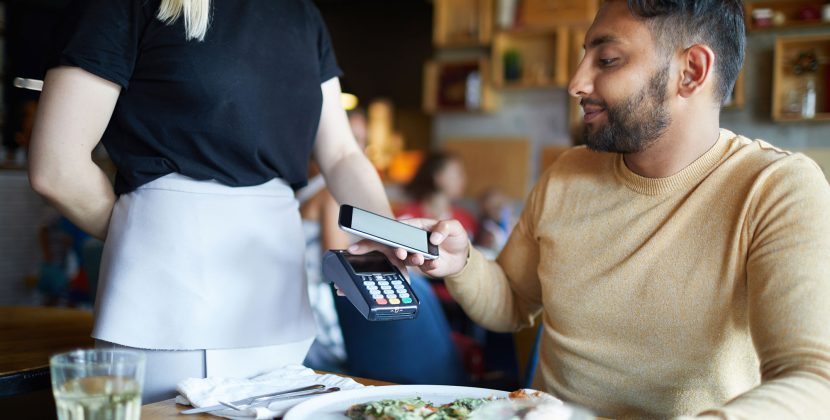
    Many users accidentally trigger their default bank card instead of the EatClub Virtual Card when they double-click to pay.

    • The Error: If your default card is used, you will be charged the full price with no discount. If the EatClub card is selected but "Greyed Out," it means the card has been deactivated.
    • The Fix: Open your Wallet app manually before tapping. Ensure the EatClub Digital Card (it usually has a distinct black/pink design) is the one front and center.


    3. The "Unpaid Service Fee" Block

    EatClub charges a small service fee (typically 1% to 6%) on each transaction. In 2026, if a previous service fee failed to clear (e.g., due to an expired card on your profile), EatClub may "lock" your virtual card for future use.

    • The Fix: Open the EatClub app settings, go to "Payment Methods," and ensure your primary debit/credit card is up to date. If there is an outstanding balance, the app will prompt you to pay it before the Virtual Card becomes active again.


    4. "Merchant ID" Mismatch (The Technical Glitch)

    Occasionally, a restaurant might change their EFTPOS provider or terminal, and the new Merchant ID isn't yet synced with EatClub’s system.

    • The Fix: This is a backend issue you can't fix at the table. If your EatClub card declines twice, pay with your regular card. * The "Offer Back Guarantee": Take a photo of your receipt and send it to EatClub support via the app. In 2026, they are excellent at honoring the discount manually by refunding the difference to your bank account if the error was on their end.

    5. The "No Bookings" Safety Trigger

    In 2026, the "Walk-in Only" rule is strictly enforced. If the restaurant’s system detects you had a pre-existing booking (e.g., through OpenTable or TheFork) for the same time, the EatClub card may be automatically blocked to prevent "double-dipping" on rewards.

    • The Fix: Only use EatClub for spontaneous dining. If you made a booking, you cannot use the EatClub Pay discount.
  • Study

    1. The #1 Culprit: The "Arrival Window" Violation

    In 2026, EatClub’s security protocols are strictly tied to your GPS location and the time you claimed the deal.

    • The Rule: Your EatClub Virtual Card only "activates" during the specific window you claimed (e.g., if you claimed for a 6:00 PM arrival, the card may not work if you try to pay at 5:45 PM).
    • The Fix: If you arrived early, you must wait until your window opens or cancel and re-claim the deal (if still available) for the current time.


    2. The "Wrong Card" Shuffle (Apple/Google Wallet)

    Many users accidentally trigger their default bank card instead of the EatClub Virtual Card when they double-click to pay.

    • The Error: If your default card is used, you will be charged the full price with no discount. If the EatClub card is selected but "Greyed Out," it means the card has been deactivated.
    • The Fix: Open your Wallet app manually before tapping. Ensure the EatClub Digital Card (it usually has a distinct black/pink design) is the one front and center.


    3. The "Unpaid Service Fee" Block

    EatClub charges a small service fee (typically 1% to 6%) on each transaction. In 2026, if a previous service fee failed to clear (e.g., due to an expired card on your profile), EatClub may "lock" your virtual card for future use.

    • The Fix: Open the EatClub app settings, go to "Payment Methods," and ensure your primary debit/credit card is up to date. If there is an outstanding balance, the app will prompt you to pay it before the Virtual Card becomes active again.


    4. "Merchant ID" Mismatch (The Technical Glitch)

    Occasionally, a restaurant might change their EFTPOS provider or terminal, and the new Merchant ID isn't yet synced with EatClub’s system.

    • The Fix: This is a backend issue you can't fix at the table. If your EatClub card declines twice, pay with your regular card. * The "Offer Back Guarantee": Take a photo of your receipt and send it to EatClub support via the app. In 2026, they are excellent at honoring the discount manually by refunding the difference to your bank account if the error was on their end.

    5. The "No Bookings" Safety Trigger

    In 2026, the "Walk-in Only" rule is strictly enforced. If the restaurant’s system detects you had a pre-existing booking (e.g., through OpenTable or TheFork) for the same time, the EatClub card may be automatically blocked to prevent "double-dipping" on rewards.

    • The Fix: Only use EatClub for spontaneous dining. If you made a booking, you cannot use the EatClub Pay discount.
  • Work

    1. The #1 Culprit: The "Arrival Window" Violation

    In 2026, EatClub’s security protocols are strictly tied to your GPS location and the time you claimed the deal.

    • The Rule: Your EatClub Virtual Card only "activates" during the specific window you claimed (e.g., if you claimed for a 6:00 PM arrival, the card may not work if you try to pay at 5:45 PM).
    • The Fix: If you arrived early, you must wait until your window opens or cancel and re-claim the deal (if still available) for the current time.


    2. The "Wrong Card" Shuffle (Apple/Google Wallet)

    Many users accidentally trigger their default bank card instead of the EatClub Virtual Card when they double-click to pay.

    • The Error: If your default card is used, you will be charged the full price with no discount. If the EatClub card is selected but "Greyed Out," it means the card has been deactivated.
    • The Fix: Open your Wallet app manually before tapping. Ensure the EatClub Digital Card (it usually has a distinct black/pink design) is the one front and center.


    3. The "Unpaid Service Fee" Block

    EatClub charges a small service fee (typically 1% to 6%) on each transaction. In 2026, if a previous service fee failed to clear (e.g., due to an expired card on your profile), EatClub may "lock" your virtual card for future use.

    • The Fix: Open the EatClub app settings, go to "Payment Methods," and ensure your primary debit/credit card is up to date. If there is an outstanding balance, the app will prompt you to pay it before the Virtual Card becomes active again.


    4. "Merchant ID" Mismatch (The Technical Glitch)

    Occasionally, a restaurant might change their EFTPOS provider or terminal, and the new Merchant ID isn't yet synced with EatClub’s system.

    • The Fix: This is a backend issue you can't fix at the table. If your EatClub card declines twice, pay with your regular card. * The "Offer Back Guarantee": Take a photo of your receipt and send it to EatClub support via the app. In 2026, they are excellent at honoring the discount manually by refunding the difference to your bank account if the error was on their end.

    5. The "No Bookings" Safety Trigger

    In 2026, the "Walk-in Only" rule is strictly enforced. If the restaurant’s system detects you had a pre-existing booking (e.g., through OpenTable or TheFork) for the same time, the EatClub card may be automatically blocked to prevent "double-dipping" on rewards.

    • The Fix: Only use EatClub for spontaneous dining. If you made a booking, you cannot use the EatClub Pay discount.
  • Living in Australia

    1. The #1 Culprit: The "Arrival Window" Violation

    In 2026, EatClub’s security protocols are strictly tied to your GPS location and the time you claimed the deal.

    • The Rule: Your EatClub Virtual Card only "activates" during the specific window you claimed (e.g., if you claimed for a 6:00 PM arrival, the card may not work if you try to pay at 5:45 PM).
    • The Fix: If you arrived early, you must wait until your window opens or cancel and re-claim the deal (if still available) for the current time.


    2. The "Wrong Card" Shuffle (Apple/Google Wallet)

    Many users accidentally trigger their default bank card instead of the EatClub Virtual Card when they double-click to pay.

    • The Error: If your default card is used, you will be charged the full price with no discount. If the EatClub card is selected but "Greyed Out," it means the card has been deactivated.
    • The Fix: Open your Wallet app manually before tapping. Ensure the EatClub Digital Card (it usually has a distinct black/pink design) is the one front and center.


    3. The "Unpaid Service Fee" Block

    EatClub charges a small service fee (typically 1% to 6%) on each transaction. In 2026, if a previous service fee failed to clear (e.g., due to an expired card on your profile), EatClub may "lock" your virtual card for future use.

    • The Fix: Open the EatClub app settings, go to "Payment Methods," and ensure your primary debit/credit card is up to date. If there is an outstanding balance, the app will prompt you to pay it before the Virtual Card becomes active again.


    4. "Merchant ID" Mismatch (The Technical Glitch)

    Occasionally, a restaurant might change their EFTPOS provider or terminal, and the new Merchant ID isn't yet synced with EatClub’s system.

    • The Fix: This is a backend issue you can't fix at the table. If your EatClub card declines twice, pay with your regular card. * The "Offer Back Guarantee": Take a photo of your receipt and send it to EatClub support via the app. In 2026, they are excellent at honoring the discount manually by refunding the difference to your bank account if the error was on their end.

    5. The "No Bookings" Safety Trigger

    In 2026, the "Walk-in Only" rule is strictly enforced. If the restaurant’s system detects you had a pre-existing booking (e.g., through OpenTable or TheFork) for the same time, the EatClub card may be automatically blocked to prevent "double-dipping" on rewards.

    • The Fix: Only use EatClub for spontaneous dining. If you made a booking, you cannot use the EatClub Pay discount.
    • Accommodation
    • Banking
    • Food
    • Lifestyle
    • Health & Wellness
  • Travel

    1. The #1 Culprit: The "Arrival Window" Violation

    In 2026, EatClub’s security protocols are strictly tied to your GPS location and the time you claimed the deal.

    • The Rule: Your EatClub Virtual Card only "activates" during the specific window you claimed (e.g., if you claimed for a 6:00 PM arrival, the card may not work if you try to pay at 5:45 PM).
    • The Fix: If you arrived early, you must wait until your window opens or cancel and re-claim the deal (if still available) for the current time.


    2. The "Wrong Card" Shuffle (Apple/Google Wallet)

    Many users accidentally trigger their default bank card instead of the EatClub Virtual Card when they double-click to pay.

    • The Error: If your default card is used, you will be charged the full price with no discount. If the EatClub card is selected but "Greyed Out," it means the card has been deactivated.
    • The Fix: Open your Wallet app manually before tapping. Ensure the EatClub Digital Card (it usually has a distinct black/pink design) is the one front and center.


    3. The "Unpaid Service Fee" Block

    EatClub charges a small service fee (typically 1% to 6%) on each transaction. In 2026, if a previous service fee failed to clear (e.g., due to an expired card on your profile), EatClub may "lock" your virtual card for future use.

    • The Fix: Open the EatClub app settings, go to "Payment Methods," and ensure your primary debit/credit card is up to date. If there is an outstanding balance, the app will prompt you to pay it before the Virtual Card becomes active again.


    4. "Merchant ID" Mismatch (The Technical Glitch)

    Occasionally, a restaurant might change their EFTPOS provider or terminal, and the new Merchant ID isn't yet synced with EatClub’s system.

    • The Fix: This is a backend issue you can't fix at the table. If your EatClub card declines twice, pay with your regular card. * The "Offer Back Guarantee": Take a photo of your receipt and send it to EatClub support via the app. In 2026, they are excellent at honoring the discount manually by refunding the difference to your bank account if the error was on their end.

    5. The "No Bookings" Safety Trigger

    In 2026, the "Walk-in Only" rule is strictly enforced. If the restaurant’s system detects you had a pre-existing booking (e.g., through OpenTable or TheFork) for the same time, the EatClub card may be automatically blocked to prevent "double-dipping" on rewards.

    • The Fix: Only use EatClub for spontaneous dining. If you made a booking, you cannot use the EatClub Pay discount.
  • Visa & Immigration

    1. The #1 Culprit: The "Arrival Window" Violation

    In 2026, EatClub’s security protocols are strictly tied to your GPS location and the time you claimed the deal.

    • The Rule: Your EatClub Virtual Card only "activates" during the specific window you claimed (e.g., if you claimed for a 6:00 PM arrival, the card may not work if you try to pay at 5:45 PM).
    • The Fix: If you arrived early, you must wait until your window opens or cancel and re-claim the deal (if still available) for the current time.


    2. The "Wrong Card" Shuffle (Apple/Google Wallet)

    Many users accidentally trigger their default bank card instead of the EatClub Virtual Card when they double-click to pay.

    • The Error: If your default card is used, you will be charged the full price with no discount. If the EatClub card is selected but "Greyed Out," it means the card has been deactivated.
    • The Fix: Open your Wallet app manually before tapping. Ensure the EatClub Digital Card (it usually has a distinct black/pink design) is the one front and center.


    3. The "Unpaid Service Fee" Block

    EatClub charges a small service fee (typically 1% to 6%) on each transaction. In 2026, if a previous service fee failed to clear (e.g., due to an expired card on your profile), EatClub may "lock" your virtual card for future use.

    • The Fix: Open the EatClub app settings, go to "Payment Methods," and ensure your primary debit/credit card is up to date. If there is an outstanding balance, the app will prompt you to pay it before the Virtual Card becomes active again.


    4. "Merchant ID" Mismatch (The Technical Glitch)

    Occasionally, a restaurant might change their EFTPOS provider or terminal, and the new Merchant ID isn't yet synced with EatClub’s system.

    • The Fix: This is a backend issue you can't fix at the table. If your EatClub card declines twice, pay with your regular card. * The "Offer Back Guarantee": Take a photo of your receipt and send it to EatClub support via the app. In 2026, they are excellent at honoring the discount manually by refunding the difference to your bank account if the error was on their end.

    5. The "No Bookings" Safety Trigger

    In 2026, the "Walk-in Only" rule is strictly enforced. If the restaurant’s system detects you had a pre-existing booking (e.g., through OpenTable or TheFork) for the same time, the EatClub card may be automatically blocked to prevent "double-dipping" on rewards.

    • The Fix: Only use EatClub for spontaneous dining. If you made a booking, you cannot use the EatClub Pay discount.
    • Family & Partner Visas
    • Permanent Residency (PR)
    • Student Visas
    • Work & Skilled Visas
  • Parents Hub

    1. The #1 Culprit: The "Arrival Window" Violation

    In 2026, EatClub’s security protocols are strictly tied to your GPS location and the time you claimed the deal.

    • The Rule: Your EatClub Virtual Card only "activates" during the specific window you claimed (e.g., if you claimed for a 6:00 PM arrival, the card may not work if you try to pay at 5:45 PM).
    • The Fix: If you arrived early, you must wait until your window opens or cancel and re-claim the deal (if still available) for the current time.


    2. The "Wrong Card" Shuffle (Apple/Google Wallet)

    Many users accidentally trigger their default bank card instead of the EatClub Virtual Card when they double-click to pay.

    • The Error: If your default card is used, you will be charged the full price with no discount. If the EatClub card is selected but "Greyed Out," it means the card has been deactivated.
    • The Fix: Open your Wallet app manually before tapping. Ensure the EatClub Digital Card (it usually has a distinct black/pink design) is the one front and center.


    3. The "Unpaid Service Fee" Block

    EatClub charges a small service fee (typically 1% to 6%) on each transaction. In 2026, if a previous service fee failed to clear (e.g., due to an expired card on your profile), EatClub may "lock" your virtual card for future use.

    • The Fix: Open the EatClub app settings, go to "Payment Methods," and ensure your primary debit/credit card is up to date. If there is an outstanding balance, the app will prompt you to pay it before the Virtual Card becomes active again.


    4. "Merchant ID" Mismatch (The Technical Glitch)

    Occasionally, a restaurant might change their EFTPOS provider or terminal, and the new Merchant ID isn't yet synced with EatClub’s system.

    • The Fix: This is a backend issue you can't fix at the table. If your EatClub card declines twice, pay with your regular card. * The "Offer Back Guarantee": Take a photo of your receipt and send it to EatClub support via the app. In 2026, they are excellent at honoring the discount manually by refunding the difference to your bank account if the error was on their end.

    5. The "No Bookings" Safety Trigger

    In 2026, the "Walk-in Only" rule is strictly enforced. If the restaurant’s system detects you had a pre-existing booking (e.g., through OpenTable or TheFork) for the same time, the EatClub card may be automatically blocked to prevent "double-dipping" on rewards.

    • The Fix: Only use EatClub for spontaneous dining. If you made a booking, you cannot use the EatClub Pay discount.
  • Student Hub

    1. The #1 Culprit: The "Arrival Window" Violation

    In 2026, EatClub’s security protocols are strictly tied to your GPS location and the time you claimed the deal.

    • The Rule: Your EatClub Virtual Card only "activates" during the specific window you claimed (e.g., if you claimed for a 6:00 PM arrival, the card may not work if you try to pay at 5:45 PM).
    • The Fix: If you arrived early, you must wait until your window opens or cancel and re-claim the deal (if still available) for the current time.


    2. The "Wrong Card" Shuffle (Apple/Google Wallet)

    Many users accidentally trigger their default bank card instead of the EatClub Virtual Card when they double-click to pay.

    • The Error: If your default card is used, you will be charged the full price with no discount. If the EatClub card is selected but "Greyed Out," it means the card has been deactivated.
    • The Fix: Open your Wallet app manually before tapping. Ensure the EatClub Digital Card (it usually has a distinct black/pink design) is the one front and center.


    3. The "Unpaid Service Fee" Block

    EatClub charges a small service fee (typically 1% to 6%) on each transaction. In 2026, if a previous service fee failed to clear (e.g., due to an expired card on your profile), EatClub may "lock" your virtual card for future use.

    • The Fix: Open the EatClub app settings, go to "Payment Methods," and ensure your primary debit/credit card is up to date. If there is an outstanding balance, the app will prompt you to pay it before the Virtual Card becomes active again.


    4. "Merchant ID" Mismatch (The Technical Glitch)

    Occasionally, a restaurant might change their EFTPOS provider or terminal, and the new Merchant ID isn't yet synced with EatClub’s system.

    • The Fix: This is a backend issue you can't fix at the table. If your EatClub card declines twice, pay with your regular card. * The "Offer Back Guarantee": Take a photo of your receipt and send it to EatClub support via the app. In 2026, they are excellent at honoring the discount manually by refunding the difference to your bank account if the error was on their end.

    5. The "No Bookings" Safety Trigger

    In 2026, the "Walk-in Only" rule is strictly enforced. If the restaurant’s system detects you had a pre-existing booking (e.g., through OpenTable or TheFork) for the same time, the EatClub card may be automatically blocked to prevent "double-dipping" on rewards.

    • The Fix: Only use EatClub for spontaneous dining. If you made a booking, you cannot use the EatClub Pay discount.

Category: Food

  • Home
  • Food
Why Your EatClub Card Might Decline at the Table (and How to Fix It)

Why Your EatClub Card Might Decline at the Table (and How to Fix It)

  • Sara
  • April 7, 2026
  • 3 min read
  • 23
How Does the Restaurant Know I Used EatClub Pay? (2026 Guide)

How Does the Restaurant Know I Used EatClub Pay? (2026 Guide)

  • Maithili
  • April 7, 2026
  • 3 min read
  • 42
Do I Need to Tell Staff I’m Using EatClub Pay? (2026 Guide)

Do I Need to Tell Staff I’m Using EatClub Pay? (A Guide)

  • Aarav
  • April 7, 2026
  • 3 min read
  • 29
Top 5 No-Surcharge Brunch Spots in the Inner West (2026 Guide)

Top 5 No-Surcharge Brunch Spots in the Inner West (A Guide)

  • Sara
  • April 7, 2026
  • 2 min read
  • 32
Which Sydney Restaurants Have No Sunday Surcharges in 2026?

Which Sydney Restaurants Have No Sunday Surcharges in 2026?

  • Aarav
  • April 7, 2026
  • 3 min read
  • 87
The Hidden Cost of UberEats: Why Menu Prices are 20% Higher in 2026

The Hidden Cost of UberEats: Why Menu Prices are 20% Higher in 2026

  • Sara
  • April 6, 2026
  • 3 min read
  • 131
How to Setup Your EatClub Card in Apple Wallet in 30 Seconds (2026)

How to Setup Your EatClub Card in Apple Wallet in 30 Seconds (2026)

  • Maithili
  • April 6, 2026
  • 2 min read
  • 53
7 Secret Ways to Access RMIT and USYD Food Vouchers This Semester (2026)

7 Secret Ways to Access RMIT and USYD Food Vouchers This Semester (2026)

  • Aarav
  • April 6, 2026
  • 3 min read
  • 33
Why USYD is the Only Sydney Uni Giving $500/Year in Food Vouchers

Why USYD is the Only Sydney University Giving $500/Year in Food Vouchers

  • Maithili
  • April 6, 2026
  • 2 min read
  • 29
Why USYD Postgrads Are Flocking to the SUPRA Pantry This Semester (2026)

Why USYD Postgrads Are Flocking to the SUPRA Pantry This Semester (2026)

  • Sara
  • April 6, 2026
  • 3 min read
  • 31
  • Prev.
  • 1
  • …
  • 20
  • 21
  • 22
  • 23
  • 24
  • …
  • 27
  • Next

Popular Post

Top 10 High-Interest Savings Accounts Australia: A Student Guide

Top 10 High-Interest Savings Accounts Australia: A Student Guide (414)

  • Aarav
  • March 6, 2026
Australia Student Visa Refund Policy: Rejection Guide

Australia Student Visa Refund Policy: Rejection Guide (340)

  • Sara
  • March 9, 2026
Regional Australia Postcode List 2026: The “Extra 5 Points” Guide

Regional Australia Postcode List 2026: The “Extra 5 Points” Guide (330)

  • Maithili
  • March 17, 2026
Felix Mobile Review 2026: Is the $20 Unlimited Data Plan Worth It?

Felix Mobile Review 2026: Is the $20 Unlimited Data Plan Worth It? (325)

  • Aarav
  • March 25, 2026
Telstra vs Optus vs Vodafone 2026: Australia’s Best Network Comparison

Telstra vs Optus vs Vodafone 2026: Australia’s Best Network Comparison (315)

  • Maithili
  • March 16, 2026

Newsletter

Weather

Dhaka
haze
26℃
humidity: 78%
wind: 2.57 km/h
  • 33℃
    Thu
  • 31℃
    Fri
  • 32℃
    Sat
  • 34℃
    Sun
  • 35℃
    Mon
  • 35℃
    Tue
  • 36℃
    Wed

Retail vs Warehouse Pay: Which Sunday Shift Earns More in 2026?

  • Trent2880
  • 23 May 2026

3 Ways to Prove Genuine Regional Residence While Working Remotely (2026)

  • Allan3603
  • 23 May 2026

Best NDIS Agencies for International Students: Sydney & Melbourne 2026

  • qq222apk
  • 23 May 2026

Best NDIS Agencies for International Students: Sydney & Melbourne 2026

  • up777gamedownload
  • 23 May 2026

Best NDIS Agencies for International Students: Sydney & Melbourne 2026

  • we9game
  • 23 May 2026
Australia Student & Expat Resource Hub | NammAustralia

Nammaustralia is a practical guide for international students moving to Australia. We cover visas, jobs, accommodation, cost of living, and PR pathways with clear, research-based insights for Indian and GCC students.

Disclaimer: The information provided is for general informational purposes only. Please verify details with official sources. We are not liable for decisions made based on this content.

Start Your Journey

  • Pre-Departure Checklist
  • First 48 Hours Guide
  • Student Visa 500 Guide
  • Student Budget 2026
  • TFN Application Guide

Explore by Topic

  • Study in Australia
  • Work in Australia
  • PR & Immigration
  • Accommodation
  • Life in Australia

© 2026 Nammaustralia. All rights reserved.

  • Privacy Policy
  • Disclaimer
  • Terms of Use